
What's new in Eagle
13 October 2020
Fortnightly Roundup - 29th September to 12th October 2020
- Email templates in the send email popup now sort by alphabetical order
- Updated appraisal, listing and contract tool tip with buttons to launch popup components to create a note, new task, create inspection/create event, send email, send SMS and send letter
- New private inspection automations have been cloned to all accounts
- Added ability to send bulk emails and SMS through popup components, more info here
- Dashboard Task widget now creates tasks with task popup
- Added new activity feed to contact screen, more info here
- Added tasks to the contact activity feed, more info here
- When adding an inspection note type in the add note popup, inspection association now shows on the main note tab to help streamline workflow
- New mobile app version release, more info here
- Added links and basic formatting to emails within mobile app
- Custom fields now show in the mobile app
- Added custom fields to the API
- Bug fixes
12 October 2020
View and manage tasks in the contact activity feed
With this release we introduce tasks into the activity feed making it easier to view and manage tasks on a contact.
Having tasks within the activity feed helps to provide more context when browsing a contacts history as you can see notes, tasks, communications etc. all together in the timeline. Extra information is now included such as who created the task (or which automation created the task) and when it was created and completed.
We've also added a new Tasks category tab at the top of the feed so you can see all tasks that are linked with the contact in one place.
Tasks are ordered within the activity feed by their due date:
- Tasks that are due in the future show at the top as Upcoming
- Tasks that are overdue show a red Overdue badge
- Tasks where the due date has passed show within the activity feed based on their due date (just like any other activity feed item)
9 October 2020
Improvements to mobile app and inspection flow
We've just released a new version of the Eagle CRM mobile app which adds significant improvements to the inspection flow as well as other parts of the mobile app. Go to the Apple store or Google Play store to make sure you have the latest version.
Inspection flow
Checking in inspection attendees is faster and more streamlined. Here is a quick overview of some of the changes:
- For sales listings we've added price feedback and contract status fields which flow through to the Buyer section and vendor report
- For rental listings we've added a tenant rating which flows through to the potential tenancy in the leasing module
- When searching for contacts to check them in, results now show instantly as you type
- Before checking someone in, you can now view the contact or edit the contact to add more information such as a mobile or address
- After you tap 'Check In', a confirmation shows and allows you to edit the attendee information
- If the contact does not exist in your database after searching, a new 'add contact button' allows you to create the contact and check them in simultaneously
Improved search
When searching records such as contacts, appraisals, listings etc. the app will now instantaneously search and return results as you type.
Landscape view
The entire app is now viewable in landscape mode. This is especially useful at inspections when using an iPad or tablet.
More updatable fields
Based on your feedback we've added more fields to be viewable and updatable within the mobile app, particularly around listings.
Private inspections
We released the private inspections feature as well as being able to check in contacts to private inspections back in August. With this release you can now create private inspections and register contacts for private inspections within the app.
Design and user experience improvements
We have made a number of subtle updates to the look and feel of the app, as well as design improvements to some areas such as the Listing > Activity screen to bring it inline with the web app. We will be continuing to make design and user experience improvements overtime.
We have a lot more updates and improvements in the pipeline for the mobile app. As always your input is appreciated. Please get in touch with us to share your thoughts, ideas and feedback (03) 9016 0444 or support@eaglesoftware.com.au.
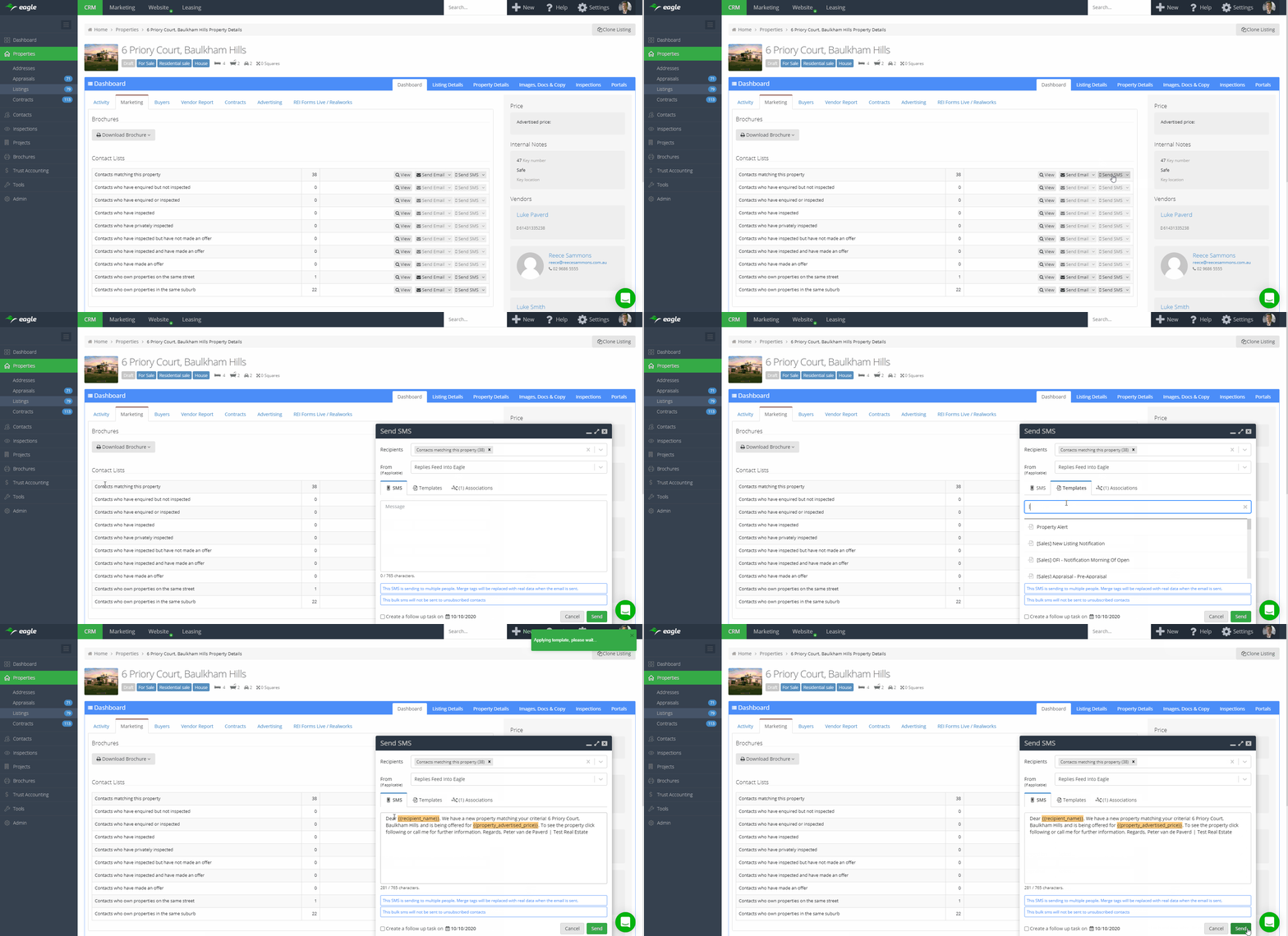
With this release we introduce the ability to send communications to many recipients at once through the send email and send SMS popups. This new functionality is ideal for sending targeted communications to small lists of contacts. For example, sending a 'just listed' or 'just sold' communication to owners in the street of a property you just listed or sold. Sending bulk communications through the popups requires the Marketing Module add on.
You can start a bulk communication through the popup from the following areas in the software:
- On the Marketing tab within a Listing
- On the main Contacts screen
- On Projects
- On Project Stages

Sending bulk emails through the send email popup
Utilise several key features of the email popup for these communications including:
- Loading an email template
- Adding associations (the communication will show on each activity feed of each association)
- Using merge field tags from both the contact and associated records
- Adding attachments
- Displaying property listings within the email
- Schedule a follow up task in the same action
Sending bulk emails through the send email popup is almost exactly the same as sending many personal individual emails at once, as such there are a few key differences compared to a bulk email campaign:
- There is no campaign report, however you can see opens and clicks on the contact activity feed like you would for any other email
- If you use email sync to send emails through your connected email account, these emails will be sent through your own email hosting and appear in your outbox/sent folder
- There is a maximum of 100 email recipients per email and we recommend using it for targeted communications only (bulk email campaigns do not have a limit)
- Unless you view the contacts first on the contacts screen, you can't exclude recipients
- Bulk emails sent through the send email popup are subject to contact subscriber settings just the same as a normal bulk email campaign. (Subscriber settings do not apply for normal emails sent through the send email popup)
Sending bulk SMS through the send SMS popup
Utilise several key features of the SMS popup for these communications including:
- Loading an SMS template
- Adding associations (the communication will show on each activity feed of each association)
- Using merge field tags from both the contact and associated records
- Schedule a follow up task in the same action
Sending bulk SMS through the send SMS popup is slightly different to an SMS campaign:
- There is no campaign report, however you can see SMS that have been sent and delivered on the contact activity feed like you would for any other SMS
- Unless you view the contacts first on the contacts screen, you can't exclude recipients
- There is a maximum of 100 SMS recipients per SMS and we recommend using it for targeted communications only (bulk SMS campaigns do not have a limit)
- Bulk SMS sent through the send SMS popup are subject to contact subscriber settings just the same as a normal bulk SMS campaign. (Subscriber settings do not apply for normal SMS sent through the send SMS popup)
30 September 2020
New contact activity feed
We're happy to announce the release of the new contact activity feed which makes it much easier to view and manage a contacts history.
A lot of client feedback, research and careful consideration has gone into the new activity feed to provide the maximum amount of information and functionality while keeping it easy to read and simple to use.
Here is an outline of the changes we've made:
- Design improvements to make it easier to scan for information and dive into details once you've found what you're looking for
- More relevant information up front, easily view and click through to any associations and launch popup components with association tooltips
- Pin notes to keep important information at the top of the activity feed
- Scrolling is now independent from the main navigation bar and right sidebar
- New category tabs to organise and quickly access different types of notes
- New filter to only show specific categories or specific note types
- Notes now have text formatting
- Manage permissions for individual notes
- Add, download and remove attachments
- Manage interest level on enquiry and inspection notes
- Manage offer amount on offer notes
- Activity feed items are now grouped by month, upcoming or pinned
We've also added new buttons at the top of the activity feed to add a note, send an email, send an SMS and send a letter. When clicked these buttons will launch the global popups with contact associations prefilled.
Stay tuned as we'll be rolling out further updates to the contact activity feed, as well as rolling out the new activity feed to other parts of the software.
29 September 2020
Fortnightly Roundup - 15th September 2020 to 28th September 2020
- Added more information and popup buttons to appraisal tooltip
- Added new merge field {{property.two_weeks_rent}}
- Updated {{property.rental_security_bond}} to print with dollar sign, commas and to two decimal points
- Added new custom field type 'Long text', use this for recording large amounts of text in a custom field
- Launched mobile app beta program, more info here
- Bug fixes
15 September 2020
Fortnightly Roundup - 1st September 2020 to 14th September 2020
- Added Forms Live integration, more info here
- Updated Rate My Agent XML format to include vendor details
- Added new user permission 'Trigger automations'. Enable this to allow uses to trigger automations manually
- Created new address merge field tags 'address_address_line_1' and 'full_address'
- Added unconditional date field to create contract page
- Minor fixes to the new Listing > Buyer section
- Updated global search to find mobiles starting with +614 by searching the same number starting with 04
- Added new contact filter Ownership > Near listing. Use this to:
- Find address owners who own a property within 'X' km of your selected property listing (distance calculated 'as the crow flies')
- Find address owners who own a property in the same street and suburb as your selected property listing
- Added new address filter Near listing. Use this to:
- Find addresses within 'X' km of your selected property listing (distance calculated 'as the crow flies')
- Find addresses in the same street and suburb as your selected property listing
- On Dashboard > Task widget, added 'Add note' button which uses the add note popup and prefills associations based on the associations of the task
- Rolled out contact tool tips across the software to make it easier to quickly view information and launch prefilled popup actions
- New contact merge field tags:
- {{appraisal.contacts_first_names}}
- {{appraisal.contacts_full_names}}
- {{address.owners_first_names}}
- {{address.owners_full_names}}
- {{contact_and_spouse_first_names}}
- {{contact_and_spouse_full_names}}
First name tags will merge all first names regardless of how many (eg. John OR John and Mary OR John, Mary and James).
Full name tags will merge all full names regardless of how many (eg. John Smith OR John Smith and Mary Jones OR John Smith, Mary Smith and James Jones)
- New contract merge field tags:
- {{contract.deposit_remaining}}
- {{contract.commission_inc_gst}}
- {{contract.commission_and_advertising_budgeted_inc_gst}}
- {{contract.commission_and_advertising_payable_inc_gst}}
- New property merge field tags:
- {{property.bond_and_one_months_rent}}
- {{property.bond_and_two_weeks_rent}
14 September 2020
Forms Live Integration
Forms Live is an online agreements and forms product for Victoria.
With this release you can now connect your Forms Live account with Eagle. This integration allows you to load form templates within your Eagle account and have key information prefilled from addresses, appraisals, listings or contracts.
This release builds on the existing integration for REI Forms Live / Realworks which is an online agreements and forms product for all Australian states and territories except Victoria.
Follow this help article to setup both the Forms Live or REI Forms Live / Realworks integration.
1 September 2020
Fortnightly Roundup - 18th August 2020 to 31st August 2020
- Updates to the Buyer tab within a listing:
- Added price feedback
- Added infinity scroll
- Added Homepass integration, more info here
- On CRM > Inspections screen, 'New Inspection' button now uses the new event/inspection popup
- On event/inspection popup, updated end time to dynamically default to 30 minutes after start time
- Added confirmation/warning message when creating a task without any associations
- On add note popup, added required associations to main note tab to streamline the process of adding note associations
- On all global component popups, the associations tab now displays the number of associations selected
- Added SEO Friendly URL functionality to menu items
- Removed send email and send SMS functionality from their template settings pages, made redundant by new component popups
- When using advanced filters on property tags it now shows a list of all current property tags to make finding them easier
- Upgrades to API - additional property fields, enquiries, tasks
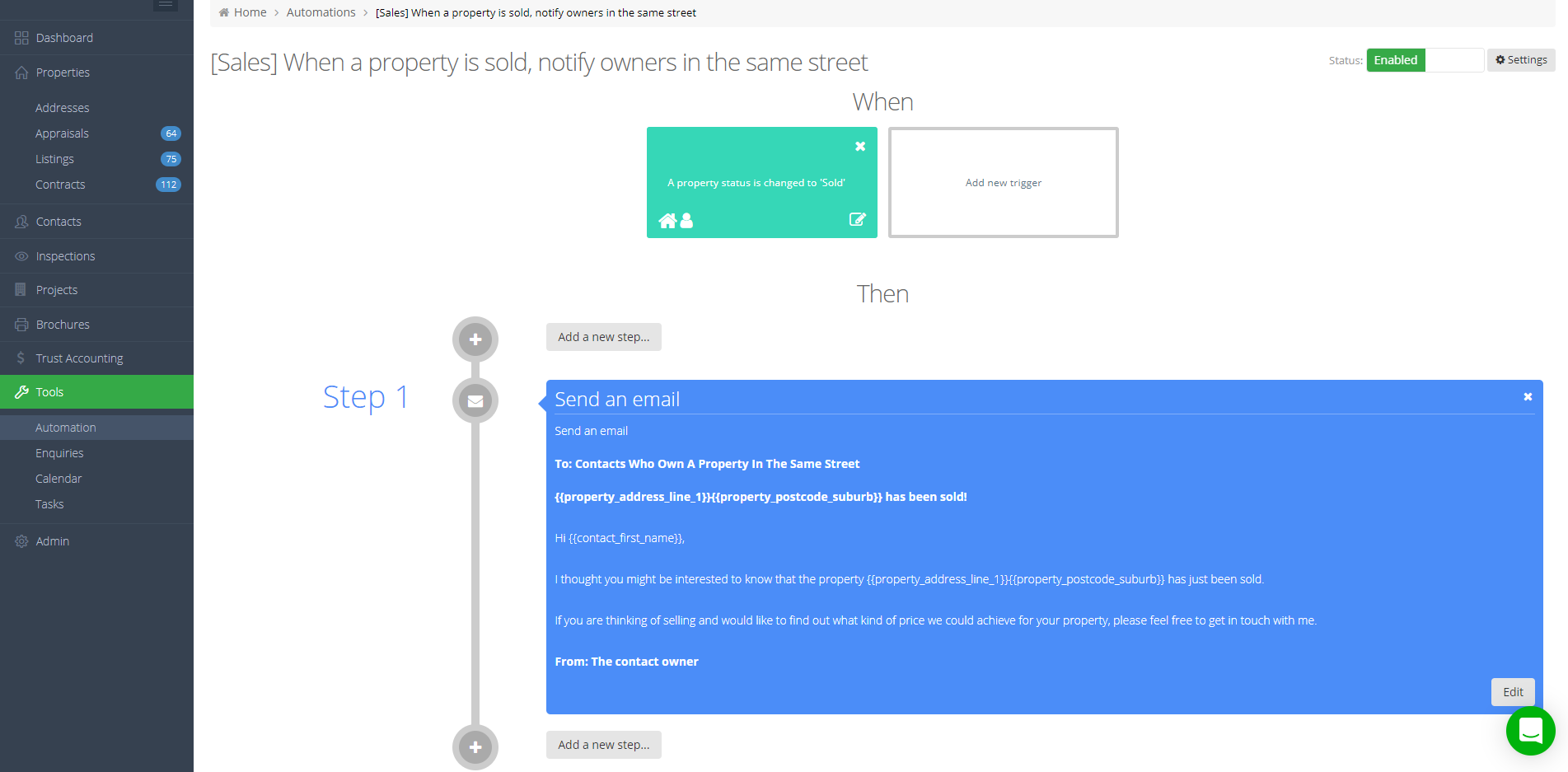
- Upgraded the automation action 'send an email' to be able to send to 'contacts who own a property in the same street'. Use this to automatically notify owners in your database of new or sold listings in their street.
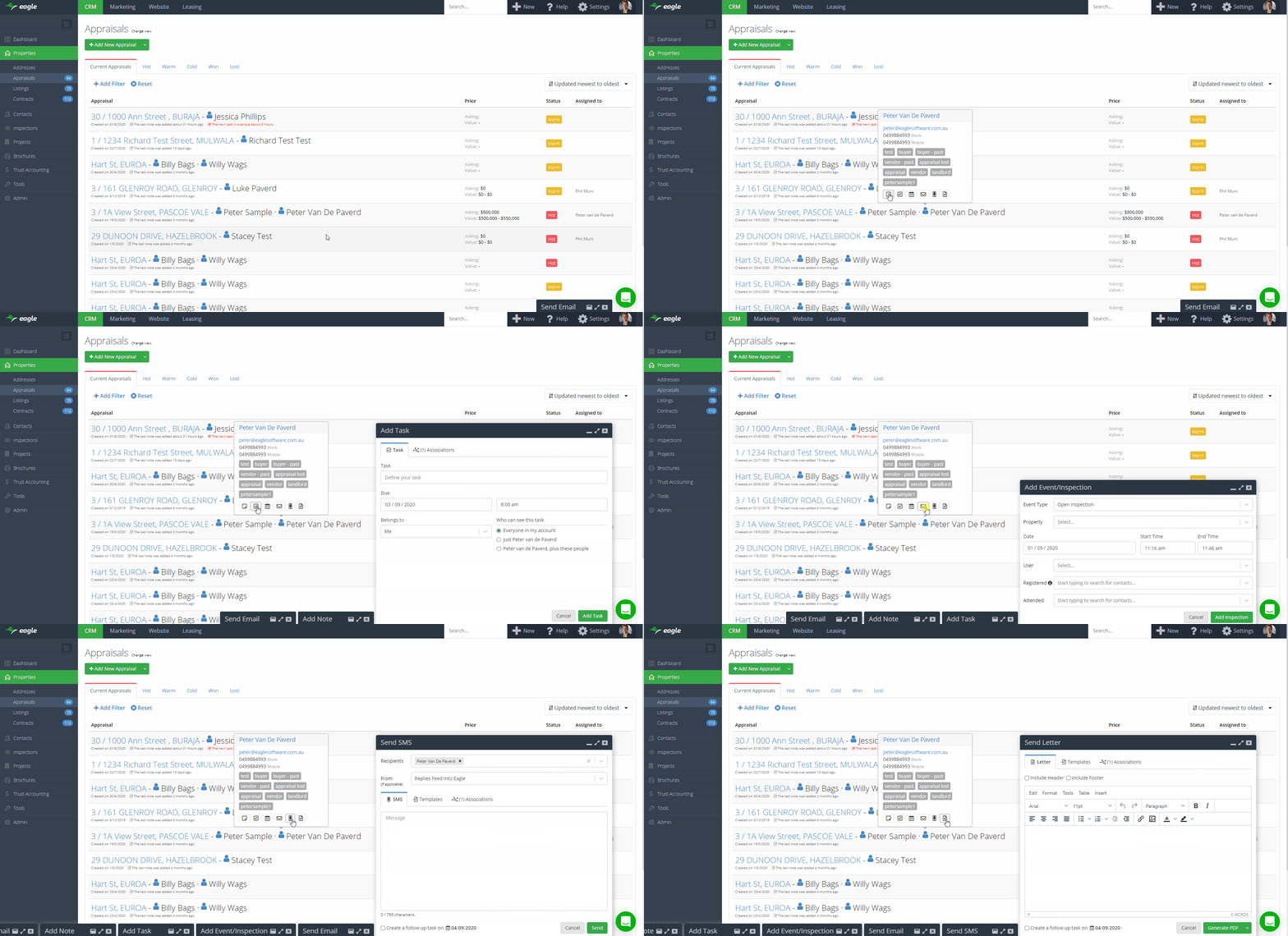
- On contact tooltips, added ability to add note, add task, schedule event, send email, send SMS and send a letter using the new popups
- New contact merge field tags:
- {{appraisal.contacts_first_names}}
- {{appraisal.contacts_full_names}}
- {{address.owners_first_names}}
- {{address.owners_full_names}}
- {{contact_and_spouse_first_names}}
- {{contact_and_spouse_full_names}}
First name tags will merge all first names regardless of how many (eg. John OR John and Mary OR John, Mary and James).
Full name tags will merge all full names regardless of how many (eg. John Smith OR John Smith and Mary Jones OR John Smith, Mary Jones and James Johnson)
- New contract merge field tags:
- {{contract.deposit_remaining}}
- {{contract.commission_inc_gst}}
- {{contract.commission_and_advertising_budgeted_inc_gst}}
- {{contract.commission_and_advertising_payable_inc_gst}}
- New property merge field tags:
- {{property.bond_and_one_months_rent}}
- {{property.bond_and_two_weeks_rent}}
1 September 2020
Homepass Integration
You can now use Eagle and Homepass together with our new two way Homepass integration.
Listings push from Eagle to Homepass
Listings are pushed via an XML feed, similar to how you push listings to portals. Once setup, Homepass will appear as an option in the portal tab of each listing and you can have this enabled by default for new listings.
Inspection data comes from Homepass back into Eagle
Eagle pulls updated data from Homepass every 10 minutes. The following activities in Homepass are synchronised in Eagle:
- Adding, updating or deleting a contact
- Adding, updating or deleting a contact note
- Checking in at an inspection
- Adding an inspection note
- Sending a document
Visit our help article for instructions on how to setup the Homepass integration.
